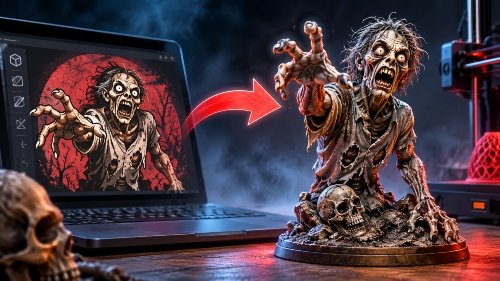
From a Horror Design to a 3D Monster: Bringing Our POD Creations to Life with Tripo AI
Horror fans have incredibly active imaginations. Whether we’re thinking about terrifying creatures, haunted objects, or everyday items transformed into something sinister, another idea is always waiting to escape onto the page.
These days, creating creepy characters and original horror artwork has become easier than ever, thanks to AI-powered creative tools. But what happens when a two-dimensional design is no longer enough? What if you want to take an illustration you’ve created and turn it into an actual 3D model?
In this article, we’ll look at Tripo – a clever AI tool that can turn our images (or text) into 3D models that can be further prepared for 3D printing and other creative projects. We will try it, explore what creators might do with the models they generate, and cover Tripo’s Black Friday offers, which include discounts of up to 65% on selected plans.
Affiliate Disclosure: This article contains affiliate links to Tripo AI. If you make a qualifying purchase through these links, Horror World earns a commission at no additional cost to you. Our opinions and impressions are based on our own experience with the platform.
What If You Could Bring Your Horror Designs to Life?
That’s the question we wanted to explore at Horror World. We have created dozens of original designs as part of our Print on Demand (POD) project. The concept is simple: we take familiar, everyday objects – food, household items, and other ordinary things – and transform them into strange, funny, and sometimes downright disturbing creatures. Each design has its own personality, often with a visual twist or a clever message behind it.
We decided to see whether we could bring one of these designs to life using Tripo AI, an AI-powered 3D creation platform that turns ideas and visual references into three-dimensional models. Instead of building a model manually from scratch, users can start with a written description or an image and let the AI generate a 3D version. The platform supports a range of creative workflows, including 3D printing, game development, animation, digital design, product visualization, and more.
One of its most interesting features is that it doesn’t stop at generating a model. Tripo also offers tools to refine and prepare 3D assets, including texturing, retopology, segmentation, UV mapping, and automatic rigging and animation.
In other words, Tripo aims to help creators move from an initial concept toward an asset they can use in a broader production workflow. You don’t need to be an experienced 3D artist to get started. The interface is browser-based, and the basic generation process is relatively straightforward.
Check Tripo’s Black Friday offers here
Affiliate link: Horror World earns a commission on qualifying purchases made through this link.
How Does Tripo Work?
There are two particularly useful ways to start creating a model with Tripo.
Image to 3D: Turn an Existing Design into a Model
This was the feature we were most interested in testing. With Image to 3D, you upload a reference image, and Tripo generates a three-dimensional version of the subject. This is especially useful for artists and designers who already have illustrations, concept art, character designs, or product images they want to explore in 3D.
For example, you could upload an illustration of a monster, a fantasy character, a strange-looking piece of furniture, or even a stylized food item. Tripo then interprets the image and builds a model that captures its overall shape and appearance.
The quality of the reference image matters. A clear image with a visible subject and a relatively simple background gives the system a better starting point.
Text to 3D: Create Something from a Description
You can also start with nothing more than a written prompt. Describe the object or character you want to create, including its shape, materials, style, and important features. Tripo then generates a 3D model based on that description. For example, you could ask for a creepy, decaying teddy bear with cracked porcelain eyes, or a strange creature made from melting chocolate and twisted candy.
This approach is particularly useful when you have an idea but haven’t created an illustration of it yet. It can also help you explore several visual directions before committing to a final design.
Tripo offers different generation modes depending on whether you want a highly detailed model or a more optimized mesh for a production workflow. High-detail generation can take a few minutes, while the Smart Mesh option can produce results much faster, depending on the settings. Once the model is ready, you can inspect it in the 3D viewer, rotate it, zoom in, and examine it from different angles.
Our Experiment: Bringing a POD Horror Design to Life
We wanted to test Tripo with something more interesting than a generic 3D object.
As mentioned earlier, we’ve been working on a Print on Demand project that transforms everyday objects into horror-inspired characters. The designs combine familiar subjects with exaggerated expressions, unexpected details, and a touch of dark humor.
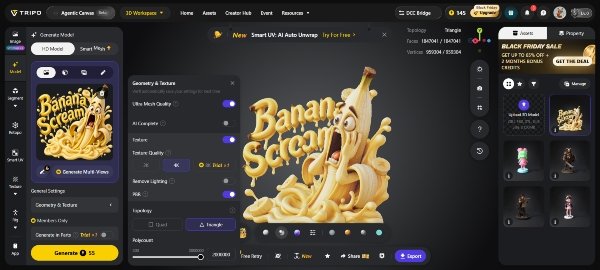
For this experiment, we chose one of our original creations: Banana Cream Scream. The design transforms a familiar banana cream dessert into a screaming, banana-themed horror character. It’s a playful twist on an everyday treat, combining food-inspired imagery with an exaggerated horror aesthetic. Originally created as a two-dimensional POD design, it was intended for products such as shirts and other merchandise.

Our question was simple: could Tripo turn this flat illustration into something that looked like an actual 3D creature?
We uploaded the original image to Tripo’s Image to 3D interface and started the generation process. The result was a lot of fun, and it opened up some interesting possibilities beyond the original artwork. A design that started as a flat illustration could potentially become a 3D collectible, a game character, a printable model, or an asset for a larger creative project.
One thing we appreciated immediately was the simplicity of the workflow. We didn’t need to navigate a complicated modeling environment or manually build the object piece by piece. We selected the image input, uploaded our design, adjusted the generation settings, and started the process.
After a short wait, the model appeared in the 3D workspace. And we have to say: seeing one of our original designs transformed into a three-dimensional object was genuinely satisfying.
We also tested Tripo with another original POD design: The Final Pearl – a playful, slightly twisted take on the classic horror movie trope of the “Final Girl.” In our version, the familiar last-woman-standing figure is covered from head to toe in pearls, while a sinister-looking character lurks behind her, suggesting that the nightmare is far from over.

We chose this design because of the contrast between the elegant, almost doll-like appearance of the woman and the threatening figure following her. We were particularly pleased to see that Tripo preserved this sense of depth in the 3D model. The hidden figure remains visible behind her, creating an unsettling “someone is watching you” effect that was essential to the original composition. It was another great example of how an existing 2D design can gain a new dimension – quite literally – when transformed into 3D.
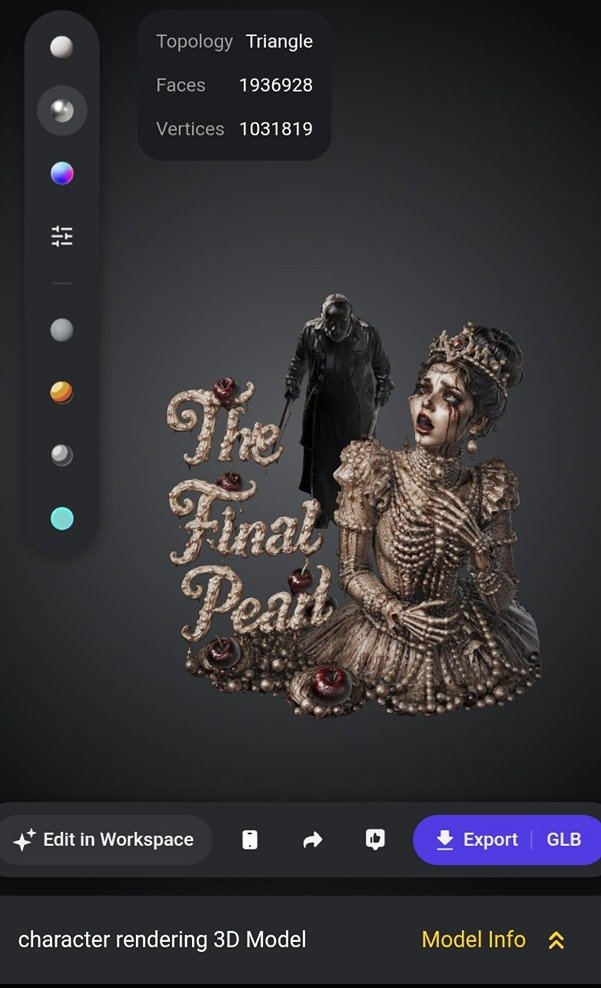
The result wasn’t simply a copy of the original image. It was an interpretation of the design in three dimensions, which is exactly what we wanted to explore. In both cases, the generated model retained the central idea and the recognizable visual identity of the original artwork, while adding volume and depth. Instead of looking at a flat illustration, we could now rotate the character and examine it as a 3D object.
The experience also made us think about the potential of this workflow. If you already have a collection of original illustrations, you don’t necessarily have to leave them as flat images. You can experiment with turning them into models and see which ones could work in entirely different formats.
Of course, not every generated model will be perfect on the first attempt. Inspect the result carefully, especially if you plan to use it in a game, print it, or prepare it for commercial production. But to explore an existing design in 3D, we found the process accessible and enjoyable.
What Can You Actually Do with a Tripo 3D Model?
This is where things become particularly interesting. A 3D model isn’t just an image that you can rotate on your screen. Depending on its quality, structure, and intended use, it can become part of several different creative projects.
3D Printing and Physical Collectibles
One obvious possibility is 3D printing. Tripo supports export formats such as STL and 3MF, which are commonly used in 3D printing workflows. Its Segmentation feature can also split a model into separate parts, which may help when preparing larger or more complex objects for printing.
Imagine turning an original horror character into a small collectible figure, a desk ornament, or a miniature creature for a display shelf.
For POD creators, this could open an entirely different direction: instead of selling only two-dimensional designs printed on clothing and accessories, you could potentially develop physical 3D products based on the same original concepts.
There is an important distinction, though. Generating a model doesn’t automatically mean it’s ready for printing. You may need to check its geometry, make sure the mesh is suitable for your printer, adjust the dimensions, and prepare the file using dedicated 3D-printing software.
Game Development
Another exciting possibility is game development. Tripo supports formats such as FBX, OBJ, and GLB, and offers integrations with tools and platforms including Blender, Unity, Unreal Engine, Godot, and others. This means that a generated model could potentially become a character, creature, environmental object, or other asset in a game project.
For example, imagine a horror game featuring monsters based on everyday objects: a walking coffee machine, a possessed teddy bear, or a terrifying banana creature. Instead of starting the modeling process from scratch, a developer could use Tripo to create an initial version and then refine it for the game.
The platform also includes tools for retopology and rigging. These can help prepare models for more advanced workflows, including animation.
Animation and Digital Content
A static 3D character is only the beginning. Tripo offers automatic rigging and animation features that can add a digital skeleton to supported characters and help creators prepare them for movement. This could be useful for short videos, social media content, animated scenes, storyboarding, and other visual projects.
For a horror creator, the possibilities are easy to imagine: a creature slowly turning its head, a monster emerging from an ordinary object, or a familiar character appearing in a short animated nightmare.
More Horror Ideas: What Else Could We Create?
Our first experiment focused on bringing an existing design to life, but there are plenty of other ways to use Tripo for horror-related projects.
Here are a few ideas we’d love to explore:
✅ Original horror monsters: Create creatures from written descriptions, without needing to draw them first.
✅ Haunted everyday objects: Turn ordinary household items into strange 3D characters that could become collectibles or game assets.
✅ Horror game environments: Experiment with creepy furniture, props, decorations, and other objects for a haunted house or abandoned location.
✅ 3D horror collectibles: Develop original characters into models that could potentially be printed and displayed.
✅ Animated monsters: Use rigging and animation tools to bring a horror character to life.
✅ Digital merchandise: Explore new ways to use existing horror artwork beyond traditional POD products.
One of the most appealing aspects of AI-powered 3D creation is that it can make experimentation more accessible. You can test an idea, see how it looks in three dimensions, and decide whether it’s worth developing further. For creators who already have a collection of original artwork, that can be a very interesting opportunity.
Selling 3D Assets
According to Tripo’s current licensing information, paid subscribers can use, modify, distribute, and commercially exploit models generated under an active paid subscription, subject to the platform’s terms and any third-party rights involved. That could include selling models as digital assets, using them in commercial games, client projects, animation, or physical products.
There is an important licensing distinction to understand before turning your creations into a business. According to Tripo’s current documentation, Free-plan outputs are public by default, and Tripo owns the intellectual property rights in those outputs. Commercial use requires attribution. Paid-plan outputs, on the other hand, offer full commercial-use rights, and users retain ownership of their generated content when the models are set to Private. Always check the current licensing terms and privacy settings before using a model commercially.
You also need to own or have permission to use the original image you upload. A paid Tripo subscription does not give you rights to someone else’s copyrighted artwork or characters.
For creators working with original POD designs, this distinction is particularly important. If you want to build a commercial collection around your own characters, make sure you understand the plan and licensing conditions before generating the models you intend to sell.
Tripo AI Black Friday 2026: Save Up to 65%
If you’ve been thinking about trying Tripo or upgrading your subscription, the platform is currently running a Black Friday promotion. The Black Friday offer runs from November 23 to December 4, 2026, with discounts of up to 65% on selected annual and two-year plans, plus bonus credits.
Here are the offers provided:
| Plan | Black Friday offer |
| Pro Annual (3K / 6K / 12K) | 50% off + 1 extra month of credits |
| Max Annual | 60% off + 1 extra month of credits |
| Pro Two-Year | 55% off + 2 extra months of credits |
| Max Two-Year | 65% off + 2 extra months of credits |
The Pro plans may be a better starting point for individual creators who want more generation credits and commercial-use features. Max is aimed at users with heavier workloads and more demanding production needs.
The exact price depends on the plan and subscription duration. Check the offer page before purchasing to see the final price, the applicable billing terms, and the bonus credits included with your selected plan.
There is also an audience promo code: TRIPOSPARK. This code is available globally to new users purchasing Pro or Max monthly or annual subscriptions through December 31, 2026. The code has a separate validity period from the Black Friday sale, which ends December 4.
Is Tripo Worth Exploring?
Our experiment started with a fairly simple question: could we take one of our existing horror designs and bring it to life in 3D?
The answer was encouraging. Tripo made it relatively easy to turn our Banana Cream Scream and The Final Pearl illustrations into three-dimensional models, giving us a new way to explore the creative potential of our existing artwork. What we liked most was the possibility of taking a design beyond its original format. An illustration created for a T-shirt or a sticker could become the starting point for a collectible, a game asset, an animated character, or another digital project.
That doesn’t mean Tripo replaces professional 3D modeling software or that every generated model is immediately ready for commercial production. More complex projects may still require editing, optimization, and additional work in tools such as Blender or a game engine. But as a way to experiment, explore concepts, and create an initial 3D version of an idea, it is an interesting tool to have in your creative workflow.
For horror artists, POD designers, game developers, and anyone who enjoys turning unusual ideas into visual creations, we’d say it’s worth taking a look. If you already have a collection of original designs sitting in a folder, it may be time to see them from a different angle.
Check Tripo’s Black Friday offers here
Affiliate link: Horror World earns a commission on qualifying purchases made through this link.